 Yard Notes
Haulbase · Issue 2 · November 2026

Hey,
October was a big month, and most of what's new is for the road: a board for your trucks, a screen for your drivers, and photos at every stop. If your season is winding down, start with the first section. It's how to rest your page for the winter and keep everything on it.
Josh
Closing up for the winter
Off season, $17 a month
If your work stops when the snow comes, switch to Off season in Billing. It's $17 a month with no fee, and your products, customers and bookings all stay put.
Your page stays up with your prices and photos, but every Book now and Order button reads "Closed for the season" with your number, so nothing can be booked, ordered or paid for. A bill for work you already did can still be paid. Your dashboard works as it always does, so you can fix prices and add photos over the winter, and switch back any month.
Out of season and Coming soon
Edit any product and set "On your booking page" to Out of season or Coming soon. It stays on your page with its price, photos and specs, and says Out of season or Coming soon where the button was, so nobody can order it. Good for sod in winter, or something you're getting in next month.
On the road
Dispatch, and a screen for your drivers
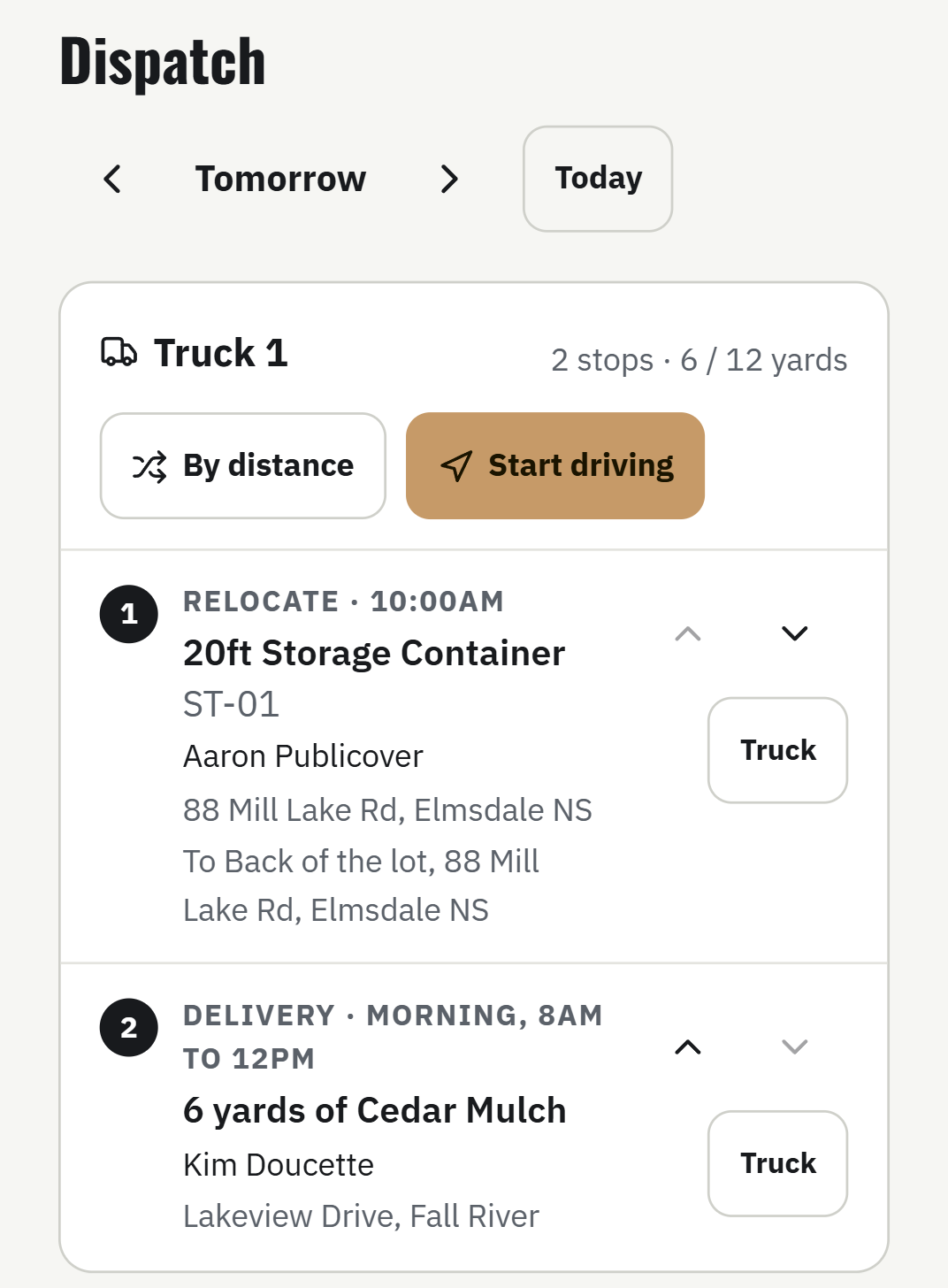
The new Dispatch screen shows a day's stops by truck: drop offs, pickups, deliveries and bin swaps, in the order you'll drive them. Drag them around, move one to another truck, or tap By distance to put the nearest next. Start driving sends the route to Google or Apple Maps.
Add a driver in Settings, Team. They sign in to their own screen with their truck's stops for today and tomorrow, and nothing about money. Each morning it asks which truck they're on, so a driver isn't tied to one. Dispatch is on every plan. A driver has a login of their own, so drivers come with Growth.
- Photos and a signature at every stop. The driver takes up to six photos and gets a signature and the name of who signed, or taps nobody home. On a bin billed by the tonne, the weight off the scale ticket goes in too. The photos stay on the booking.
- Done from the truck. A driver's Done on a drop off, a delivery or a trip back moves the booking along the way your own button would, unless money or an unsigned agreement is still waiting on you. A load that goes out a day early can be marked delivered too.
- No signal, no problem. The day's stops are kept on the driver's phone. Out of range, the photos, the signature and Done wait and send by themselves when there's signal.
- A text when the truck is on its way. When the driver taps Start driving, your customer gets a text that you're on the way, and another when the stop is done. Switch either one off in Settings. Texting comes with Growth.
Morning and afternoon deliveries that fit your truck
Set your morning and afternoon times in your delivery schedule, and customers pick one when they order. Haulbase works out the drive there and back by road, plus your time to unload, and only offers a window while your truck still has the time. Phone orders you type in fill the same windows.
Out now: everything that's out, and where it went
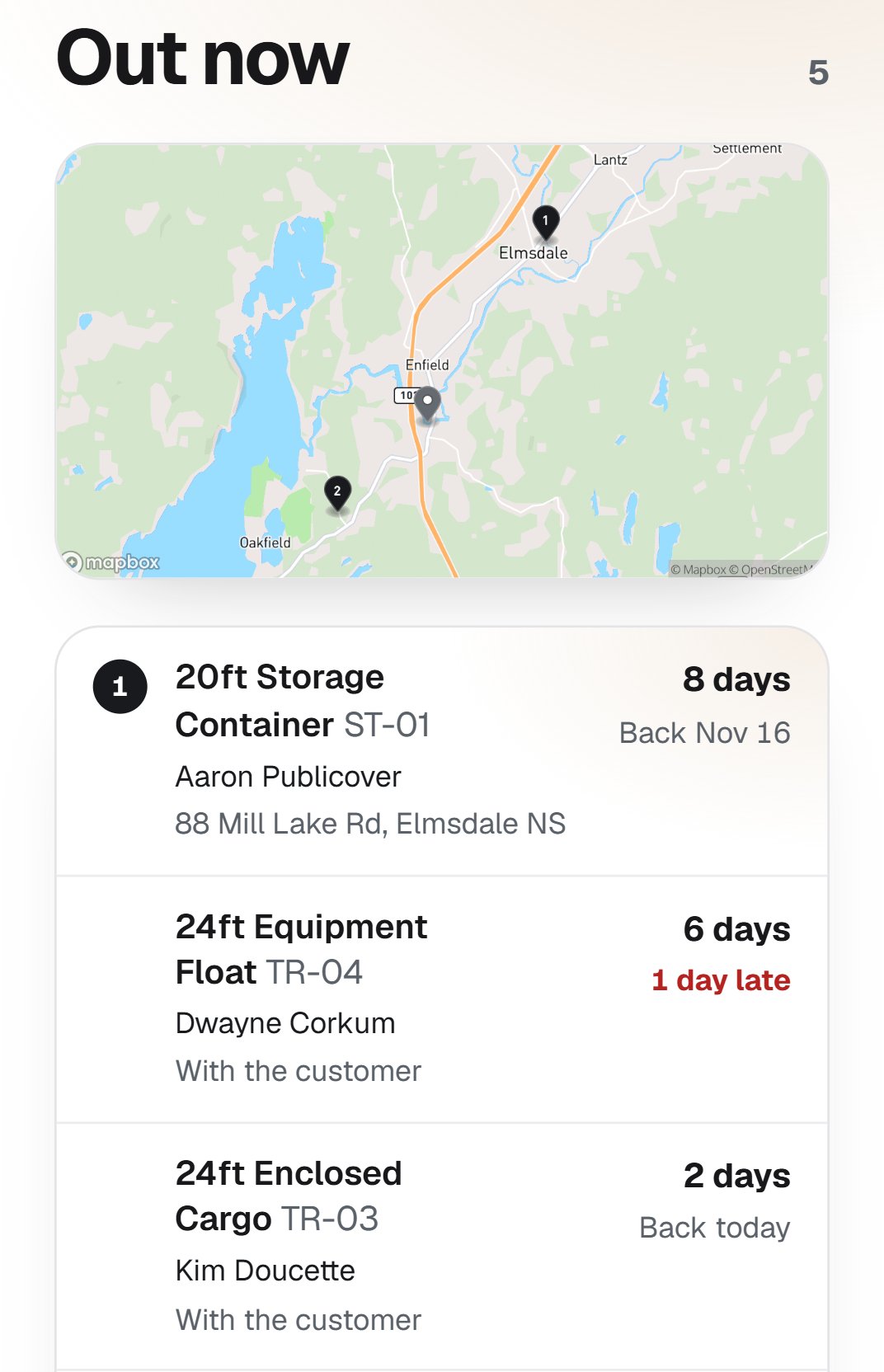
The new Out now screen shows everything that's out, on a map and in a list, longest out first: which one it is, who has it, the address it went to, how many days it's been gone and when it's due back, in red when it's late. On Today, a bin that's been out longer than its price covers shows under To collect.
Pickups, swaps and dump and returns
A bin that's out now has a Jobs section: add a pickup, a swap, a dump and return or a relocate, each with its own day, truck and note. Type the weight off the ticket when a swap is done and the bill works itself out. Your customers can ask for a swap or a pickup from their own booking, and it lands with you to confirm.
Getting paid
Send the bill first, or take it from the hold
In Settings, Business, pick what happens to anything owed when a rental comes back, like extra hours, fuel or damage. Take it from the deposit hold, the way it's always worked, or Send it on the bill first, so your customer sees it and pays with any card they like.
You can still use the hold on any one return. Your page tells customers which way it works before they book.
- Refund a card payment yourself. Open a card payment in Payments, tap Refund, and give back all of it or part. It goes back to their card from your Stripe, and the receipt says Refunded or Part refunded.
- What you keep. Each card payment on Payments shows Stripe's fee, what you keep after it, and roughly the day it lands in your bank. Only the account owner sees it.
- Print all your receipts at once. On Payments, tap Print these receipts, take out any you don't want, and print. Choose Save as PDF for one file with each receipt on its own page, up to 300 at a time.
- Approve a request from the text. The text and email you get for a new request now end with a link. Tap it and your dashboard opens on that request with Approve and Decline.
Your page and your team
- A booking a step at a time. When a customer taps Book now or Order on your page, they go through it on a full screen: the dates and the price first, then their details. Nothing to switch on.
- Your page, looking like your website. In Your booking page, tap Match my website and type your web address. Your logo, colours and main photo come onto your page, and you can change anything before you publish. Tap Update from my website whenever your site changes.
- Several of the same, shown once. Got three of the same trailer, or eight 20 yard bins? Set one up and tap More of these. Your page shows one listing with how many are free for the customer's dates, and each booking lands on one that's free.
- Pick up or delivered. Turn on "Customers can pick up here too" where you set a location's delivery pricing, and your page asks whether they'll pick it up or want it delivered.
- A pickup receipt you scan. A customer who pays for a pickup order gets a receipt with PAID, what to load and a QR code. Scan it with your phone at the yard and tap Mark picked up.
- More than one person in charge. In Settings, Team, invite someone as an Admin. They can change your settings, your page and your products, and add staff and drivers. Billing, your plan and Stripe stay with the owner.
In the industry
Building carries on into the fall
Canada started homes at an annual pace of 248,896 in September, up 3 per cent from August. Work that's underway now keeps needing gravel, fill and machines through the winter.
Source: Canada Mortgage and Housing Corporation, Oct 16
One thing to try
Get your receipts together before the snow
The Canada Revenue Agency expects a record of every sale, kept for six years. Before you close up, open Payments, pick this year's dates and tap Print these receipts. Save it as a PDF and you have one file for your accountant, with the spreadsheet and the By month view beside it.
Source: Haulbase, The records the CRA expects a small rental yard to keep, Oct 12
One question
What's one job you still do by hand that you'd like gone before spring?
Tell me at hello@haulbase.ca. I read every one, and it's how I decide what to build next.